
Why Schools Get So Many Phishing Emails in Their Inboxes
If your school inbox seems to attract phishing emails like a cafeteria floor attracts crumbs, you are not imagining it. Schools are not being picked at random, and the reasons reveal what kind of…
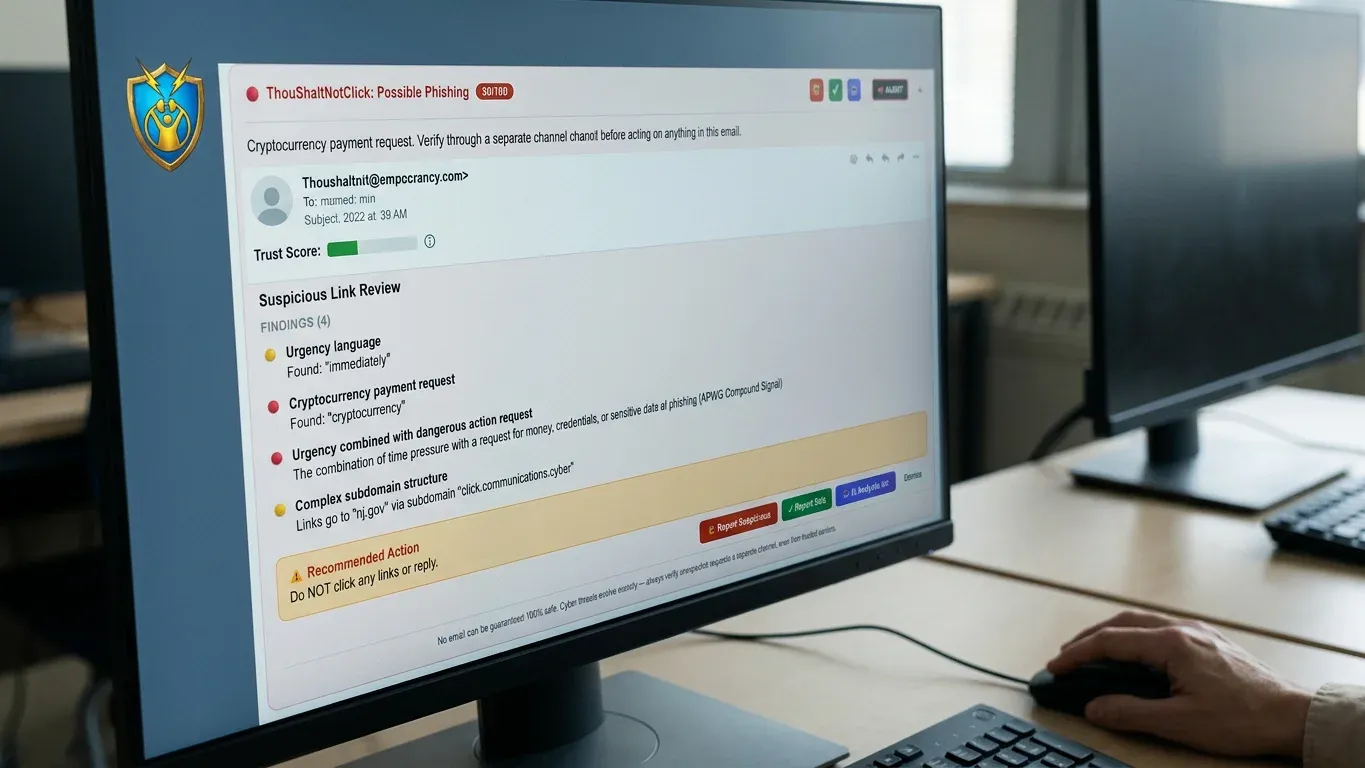
If your school inbox seems to attract phishing emails like a cafeteria floor attracts crumbs, you are not imagining it. Schools are not being picked at random, and the reasons reveal what kind of protection actually helps.
Useful data: The school inbox holds more than lesson plans, and attackers know which pieces open the most doors.
Trusted relationships: A school runs on helpfulness, and scammers twist that virtue before anyone has time to think.
Believable routines: The best scams borrow the shape of emails staff already expect.
Thin security teams: Smaller schools often defend a big community with very few hands.
Calendar pressure: School-year urgency gives attackers ready-made excuses to rush people.
One account opens many doors: A single click can give a scammer a better costume for the next email.
Practice gaps: People cannot reliably spot school-shaped scams they have never practiced catching.
The uncomfortable part is not that schools are careless. It is that schools are useful, trusted, busy, and human. That combination is exactly what phishing was built to exploit.
Why phishing emails keep finding school inboxes
Schools receive so many phishing emails because attackers see a high-trust community with valuable accounts, money movement, personal information, and plenty of daily urgency. The school inbox is not just a mailbox. It is a hallway, front office, filing cabinet, payment desk, and announcement board all squeezed into one screen.
The pattern is simple: attackers go where one message can create many chances.
That explains why the same types of scams keep returning with new paint. A fake invoice, a password warning, a parent message, or an urgent leadership request may all be different costumes, but the goal is the same: get one person to click, reply, sign in, send money, or open a door that should have stayed closed.
The data looks boring until a scammer sees what it unlocks
You may see ordinary school communication. An attacker sees access.
A school inbox can connect to systems and conversations that matter deeply to the whole community:
Accounts: email, cloud files, learning tools, staff portals, and admin systems.
Payments: tuition questions, vendor invoices, fundraising, payroll, and reimbursements.
Contact information: families, staff, board members, clergy, volunteers, and donors.
Files: forms, reports, schedules, HR documents, and student-related records.
Password resets: the quiet doorway into other tools connected to email.
That is why an office administrator asking whether a wire-transfer request is real can make your stomach drop. The email may look small, but the risk behind it is not.
The school inbox is valuable because it sits close to both people and systems.
Attackers do not need every message to work. They only need the right message to reach the right busy person at the wrong moment.
Helpful staff are not the weakness, but attackers treat kindness like a door
Your staff are used to helping people quickly, and that is a strength of a good school. Phishing turns that strength sideways.
Social engineering is the plain-English name for this trick. Instead of hacking a machine first, the scammer tries to hack the moment: trust, urgency, authority, fear of letting someone down, or the habit of being helpful.
The scam is not counting on foolishness. It is counting on helpful people moving fast.
That is why school scams often pretend to come from someone familiar or important. They may look like gift-card requests, urgent diocese communications, donation-fraud messages, or background-check notices. None of those ideas is random. Each one borrows a real responsibility that school staff already take seriously.
No shame belongs here.
A teacher can be excellent with students and still get caught by a well-timed fake Microsoft 365 password email at 9 a.m. A front-office staff member can be careful and still pause over a message that seems to come from a trusted leader. Phishing works because it aims at normal human cooperation, not because people are careless.
The fake emails work because they borrow the school day’s real paperwork
The most believable phishing emails do not look strange at first. They look boring, routine, and just official enough.
That is the trick. A scammer does not need to invent a wild story when the school day already comes with portals, forms, invoices, account notices, and reminders.
Real school routine | How a phishing email imitates it |
|---|---|
IT password notices | A fake password expired message asks staff to sign in. |
Parent portals | A spoofed portal link claims there is a message or form waiting. |
Google Classroom alerts | A fake classroom notification pushes a rushed click. |
Supply orders | A vendor invoice appears to need approval or payment. |
Background checks | A VIRTUS or background-check impersonation asks for action. |
Faith-community updates | A fake diocesan or ministry message borrows familiar language. |
The more normal an email feels, the less likely a busy person is to slow down.
This is why generic advice like do not click suspicious links only goes so far. The hardest messages do not always feel suspicious. They feel like Tuesday.
A small IT team can still be defending a very large target
A school does not need to be large to have a large digital footprint. Even a modest campus may depend on cloud email, online grading, tuition systems, learning platforms, payment tools, shared drives, and vendor portals.
A small school can have a big digital footprint without a big security team.
That gap matters. Many private and faith-based schools operate with fixed budget cycles, lean staffing, and one IT person who is also fixing Chromebooks, supporting teachers, answering printer questions, and preparing for the next board meeting. Some schools lean on volunteers or outside help. Everyone is doing their best, but consistency is hard when the plate is already full.
Attackers notice the gaps that come from overload:
Security awareness gets pushed behind urgent school needs.
Email rules and account reviews may happen only when time allows.
Staff training can be uneven from department to department.
Cyber-insurance or audit questions arrive before proof is ready.
Lean staffing does not cause phishing, but it gives phishing more room to breathe.
The school calendar gives scammers a fresh excuse every month
Phishing often walks in wearing the uniform of whatever is already stressful this week.
The school year is full of real deadlines, so fake urgency blends in easily. A scammer does not have to create pressure from scratch. The calendar does half the work.
Enrollment season: forms, family questions, and account setup messages feel normal.
Back-to-school weeks: password resets, classroom tools, and supply orders pile up.
Payroll cycles: banking or direct-deposit messages can look time-sensitive.
Fundraising and events: donation requests and vendor payments move quickly.
Audits and insurance renewals: leaders may be asked for proof, reports, or updates.
End-of-year closeout: invoices, records, and transition tasks fill the inbox.
That is why a phishing email may seem to arrive at the perfect moment. It is not magic. It is timing.
A rushed season narrows attention. When staff are trying to serve families, finish paperwork, and keep the day moving, a message that looks merely routine can slip past the guardrails.
One clicked message can teach the next scam how to sound local
One successful click can make future phishing emails more believable because attackers may gain access to a real account, real contacts, or real language patterns. Once a scammer can imitate a trusted sender, the next message arrives wearing a better disguise.
Why one good disguise leads to another
A message from an unknown address is one thing. A message that appears to come from a familiar colleague, parish contact, vendor, or school office is much harder to judge in the middle of a busy day.
When the sender looks local, the scam no longer feels like a stranger at the door.
This is how a spoofed donation-fraud message can move quickly across a faith community or school network. People trust names they recognize. That trust is healthy in real life, but in email it needs support.
The goal is not to make everyone suspicious of everyone. That would be a miserable way to run a school. The goal is to give staff a practiced pause before they act.
The missing layer is practice that looks like your school
People get better at spotting phishing when practice looks like the real messages they face, not like a corporate training video from another planet. That is the moment when your staff needs school-shaped practice, and a platform like Thou Shalt Not Click can fit the problem better than one-size-fits-all examples.
Phishing simulation campaigns send realistic fake phishing emails to staff, then measure what happens. Did someone click? Did someone report it? Did someone catch it? When a staff member clicks, the best learning moment is immediate: show what was missed, explain why it mattered, and turn the mistake into training without embarrassment.
The point is not to catch people. The point is to help people catch the email next time.
School-specific simulations can mirror the lures that actually show up in education and faith communities: fake diocesan communications, parent-portal spoofs, VIRTUS or background-check requests, Google Classroom alerts, supply-vendor invoices, and IT password notices. Rotating sender domains also matter because staff should learn to judge the message, not simply memorize one test sender.
Proof that matters to a school leader: Schools can watch risk move in the right direction. The card-supported outcome is up to a 90% reduction in click rates after 12 months of simulation training, with analytics that can support insurance applications, audits, and board presentations.
Auto-scheduled campaigns reduce the burden on a thin IT team. Adaptive difficulty keeps practice useful as staff improve. Individual and team analytics give leaders something better than a nervous feeling: board-ready proof that people are learning.
If your school is ready to practice against the kinds of messages staff actually receive, you can start a free trial at thoushaltnotclick.com/signup, or start free as a teacher at thoushaltnotclick.com/signup/teacher.
What phishing protection should and should not be expected to do
Phishing protection works best when each layer has a clear job. Confusion starts when one tool is expected to do every job.
Layer | What it helps with | What it does not fully solve |
|---|---|---|
Email filtering | Reduces some unwanted or risky messages before staff see them. | Does not make people wiser when a believable message gets through. |
Awareness training | Explains common warning signs and safer habits. | Can fade if it stays abstract or once-a-year. |
Phishing simulations | Let staff practice recognizing realistic scams in the inbox. | Should be run without shame, not as a gotcha game. |
Reporting and analytics | Show click rates, report rates, improvement, and proof for leaders. | Do not replace daily judgment, but they make progress visible. |
Common signs of phishing include mismatched sender addresses, urgent requests, odd links, unexpected attachments, payment changes, password prompts, and messages that push secrecy or speed. Still, the best scams may only show one small warning sign.
Filters reduce noise. Practice builds judgment.
That is the practical answer hiding inside the flood of phishing emails. Schools are targeted because they are trusted communities with valuable access and very busy people. The next step is not blame. It is giving staff the kind of practice that makes the pause feel natural.
Frequently Asked Questions
Are phishing emails the same as spam?
No. Spam is often unwanted bulk email, while phishing emails are designed to trick someone into clicking, signing in, replying, sending money, or sharing information. Some phishing arrives in bulk, but the goal is deception, not just advertising.
Can email filters stop phishing emails?
Email filters can reduce risk, and they are an important layer. They cannot stop every believable message, especially when a scam imitates a trusted person, vendor, school tool, or routine workflow.
What should a school employee do when an email looks suspicious?
They should pause, avoid clicking links or opening attachments, and report the message using the school’s approved process. If the message claims to be urgent, verify it through a separate trusted channel, not by replying to the suspicious email.
How often should school staff practice spotting phishing emails?
Regular practice works better than a single annual reminder because phishing tactics change and school routines shift through the year. Short, realistic practice tied to the kinds of messages staff actually receive is easier to remember when a real scam appears.
Should students be included in phishing simulations?
For this offering, student opt-in is off by default and cannot be enabled in the current release. Schools can still teach age-appropriate digital safety in other ways, but staff phishing simulations should not be described as student campaigns here.
What is spear phishing?
Spear phishing is a more targeted phishing attempt aimed at a specific person, role, or organization. In a school setting, that could mean a message shaped around a principal, finance office, IT account, parish relationship, vendor, or familiar workflow.
If your inbox keeps proving that the old reminder to be careful is not enough, give your staff practice that feels like the emails they actually face. Start a free trial at thoushaltnotclick.com/signup, or start free as a teacher at thoushaltnotclick.com/signup/teacher.