
How to Tell If an Email Is a Phishing Scam Before Paying
When an urgent school email is sitting open and your stomach says something is off, treat it like a possible phishing scam before you reply, approve, or pay. The calm way to decide is to run seven…
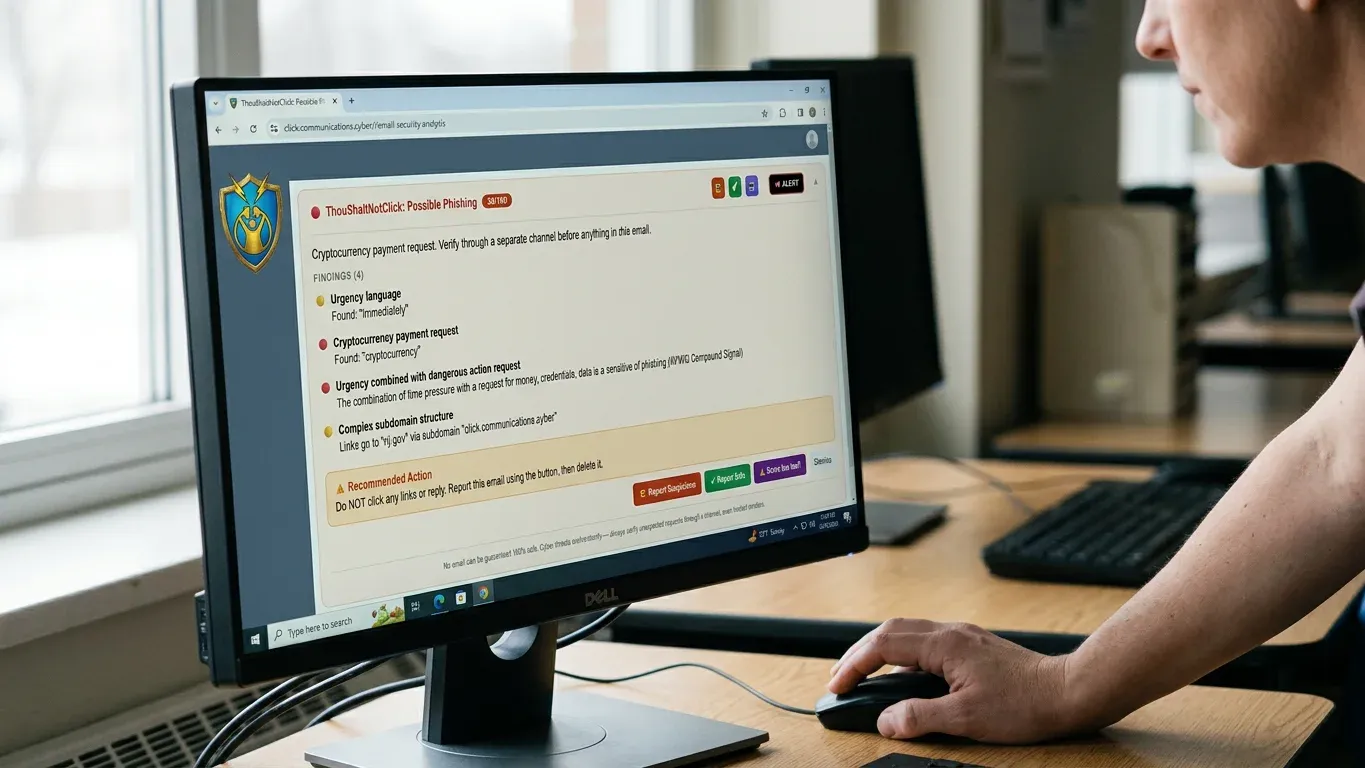
When an urgent school email is sitting open and your stomach says something is off, treat it like a possible phishing scam before you reply, approve, or pay. The calm way to decide is to run seven checks in order:
- The pressure check: The fastest scams usually try to borrow someone else’s authority before you have time to think.
- The sender check: A familiar name can sit on top of an address that tells a different story.
- The request check: The real danger is often not the wording, but what the message is asking you to do next.
- The link and attachment check: The risky part may be hidden behind one ordinary-looking button, file, or invoice.
- The confirmation check: A real payment or vendor change can wait for the channel you already trust.
- The context check: Some scams sound convincing because they copy the relationships that make a school community work.
- The second-opinion check: When the signs still point both ways, the safest answer is not a guess.
The email does not have to look ridiculous to be dangerous.
That is the part that makes good people freeze. The message may sound polite, familiar, even helpful. Your job is not to become a cybersecurity expert between lunch duty and a finance meeting. Your job is to pause long enough to make a defensible call.
Before You Touch Anything, Give Yourself One Quiet Minute
You need a small buffer between the email and your next action, because rushed decisions are where bad emails do their best work.
Before you click, reply, forward, approve, or pay, set up the moment this way:
- Keep the email open, but do not interact with links or attachments yet.
- Do not reply to the same thread to ask if it is real.
- Pull up a known phone number, vendor record, directory, or previous trusted contact.
- If your school has an IT person or administrator who reviews suspicious messages, preserve the email for them.
- If money, gift cards, private records, passwords, or banking details are involved, slow the process down on purpose.
One quiet minute is not overreacting.
It is the digital version of checking the door before you buzz someone into the building. Most of the time, everything is fine. The one time it is not, that tiny pause matters a lot.
A Phishing Scam Usually Rushes You Before It Tricks You
The first thing to check is pressure, because a phishing scam often tries to make speed feel like obedience.
Look for language that leans on urgency, secrecy, guilt, authority, or embarrassment. The email may claim the principal needs gift cards immediately, the pastor is unavailable but needs a favor, a vendor payment will fail today, or an account will close unless you act now.
Urgency is often a scammer borrowing your judgment for a few minutes.
Pressure does not prove an email is fake. Schools do have real deadlines, real emergencies, and real last-minute requests. But pressure changes how you should handle the message.
Ask yourself:
- Is the email asking me to skip our normal process?
- Is it telling me not to involve anyone else?
- Would I feel embarrassed if I paused to verify it?
- Is the sender using authority instead of details?
Slow is a security tool.
A real principal, bookkeeper, vendor, or diocesan contact should understand why you verified an unusual payment request. A scammer needs you to feel that verification would be rude, disloyal, or too slow.
The Name You Recognize Is Not the Sender You Trust
A name in the inbox is not proof, because the display name is the easiest part of an email to fake.
Think of the display name like a name tag at a conference. Helpful, yes. Enough to hand over the school checkbook, no.
| What you see | What to check |
|---|---|
| Display name | Does it only say Principal Smith, Father John, or a vendor name without proving the address? |
| Email address | Does the actual address match the one you already know? |
| Domain | Is the part after @ spelled exactly right, not almost right? |
| Reply-to address | Would your reply go somewhere different from where the message appears to come from? |
| Odd spelling | Are there extra letters, swapped letters, or lookalike words in the domain? |
The tiny details carry the truth.
If a vendor normally emails from billing@realvendor.org but this message comes from realvendor-payments@gmail.com, treat that as a stop sign. If a school leader’s name appears over a random address, same thing. If the domain looks close but not exact, slow down.
A real vendor email can also be compromised. That means an attacker may have access to a legitimate mailbox or may be imitating a real conversation closely enough to seem normal. So the sender check helps, but it is not the whole verdict.
The Ask Matters More Than the Wording
The safest question is not, does this sound professional, but what is this email trying to make me do?
A polished message can still be dangerous. A messy message can still be real. The request is where the risk usually shows itself.
Check the ask this way:
- Money: Be cautious with wire transfers, ACH payments, overdue invoices, refund requests, or urgent payment approvals, especially if the process is new or rushed.
- Credentials: Any request to sign in, reset a password, verify an account, or enter a code deserves extra care.
- Vendor changes: A bank-account change, new remittance address, or changed payment instruction should never be handled from the email alone.
- Private records: Student records, staff tax forms, payroll information, donor details, and family contact information are valuable even when no money moves.
- Gift cards: A gift-card request is not automatically fake, but an urgent gift-card request wrapped in secrecy should ring every bell in the building.
Gift cards are money with sneakers on.
Business email compromise, often called BEC, is when an attacker impersonates or takes over a trusted business identity to push payments, account changes, or sensitive actions. In a school office, that can look like a vendor invoice, a principal request, a payroll change, or a message that seems to come from someone you would normally trust.
If the email asks you to break routine, the routine is your friend. Normal approval steps may feel slow, but they are there for exactly this moment.
Links and Attachments Are Where Looks Fine Gets Expensive
The risky part of the email may not be in the words at all, but in the button, link, file, or invoice attached to it.
Do not click a link just to see where it goes. Do not open an attachment because the email looks mostly normal. That is like tasting the milk to see if it has spoiled when it already smells suspicious. There are better ways.
Use this safer inspection process:
- Look at the link text without clicking it.
- If your email program safely shows the destination when you hover, compare the destination with the visible text.
- Watch for misspelled domains, link shorteners, strange strings of characters, or websites that do not match the sender.
- If the email claims to be from a known service, go to that service through your saved bookmark or typed address instead.
- If there is an attachment you were not expecting, verify through a known channel before opening it.
Hovering over a link can reveal a mismatch, but it is not a full verdict.
Never use the suspicious email’s own path to prove the suspicious email is safe.
That includes buttons, phone numbers, reply links, QR codes, and attached instructions. If the message is bad, those paths may all lead back to the person trying to fool you.
Real Payments Can Survive a Real Phone Call
When money or sensitive information is involved, confirmation must happen outside the email that made the request.
Out-of-band confirmation means you use a channel you already trust, not the contact details supplied in the message. Call the vendor number already in your accounting system. Use the staff directory. Walk down the hall. Start a fresh email to the address you already have on file.
| If the email asks for... | Confirm by... | Do not use... |
|---|---|---|
| Gift cards | Speaking directly with the person through a known number or in person | The reply button in the email |
| Wire or ACH payment | Calling the vendor contact already in your records | A phone number inside the new request |
| Bank-account change | Using your existing vendor-change procedure | An attached form from the suspect email |
| Password reset | Visiting the service through a known website | The reset link in the message |
| Student or staff records | Checking with the administrator responsible for that data | A new email thread from an unknown address |
Real requests can handle real verification.
If someone gets irritated that you confirmed a payment or bank change, that is uncomfortable. If the request is fake and you do not confirm, that is expensive. Choose the uncomfortable minute over the expensive lesson.
The Most Convincing Scams Borrow Your School’s Trust
The emails that fool good staff members often work because they sound like the community, not because they sound like criminals.
A school is built on trust. People help quickly. They assume good intent. Faith-based communities can add another layer, because a message tied to clergy, donations, a diocese, a parish, or a family in need can feel emotionally sensitive.
In school and faith communities, trust is often the bait because trust is already in the room.
That does not mean you should become suspicious of everyone. It means you should notice when a message uses relationship pressure to move you around normal safeguards.
For example, a fake clergy letter may not demand money in all caps. It may sound humble, personal, and urgent. A donation appeal may reference a real event. A message about a family emergency may use language that makes you feel unkind for asking questions.
That is exactly why asking questions matters.
Bad grammar can be a clue, but polished writing does not make an email safe. Modern scams can be clean, warm, and specific. The old rule that fake emails always look ridiculous belongs in the same drawer as floppy disks and cafeteria mystery meat.
When You Still Cannot Tell, Stop Guessing
There will be emails where you do the checks and still cannot confidently call it real or fake.
That is not failure. That is the exact moment where a second opinion protects the school from turning one person’s hunch into a financial decision. When a staff member has done the checks and still cannot tell, a tool like ThouShaltNotClick’s AI Email Analysis gives that moment a second set of eyes without turning the office into a help desk.
It evaluates uncertain emails for sender patterns, link tricks, and body content. It can flag business email compromise, vendor fraud, urgency exploits, and faith-specific social-engineering patterns that ordinary filters may miss. It also checks links and senders against outside sources such as Google Safe Browsing, PhishDestroy, URLhaus, EmailRep, and IPQualityScore.
Privacy detail that matters in a school inboxOn the browser extension, routine scoring happens on-device, and AI-enhanced analysis is a deliberate per-email opt-in. When a user chooses AI analysis, it transmits the sender, subject, visible headers, full link URLs, and up to 3,000 characters of the email body, with the recipient’s own name and addresses stripped first. Anthropic is contractually barred from retaining or training on the transmitted content, and the 3,000-character body limit is enforced server-side at the API boundary.
That detail matters because school inboxes are not abstract. They hold family situations, personnel matters, donor conversations, and vendor records. A second-opinion tool should help without asking the office to pretend privacy is a small concern.
Flagged messages can route into an admin review queue, which is much cleaner than a solo IT person waking up to a pile of forwarded emails that all say, is this safe? The goal is a shared habit: if it feels off, do not guess, do not click, and do not make the payment alone.
If your staff need that one-click second opinion before they reply, approve, or pay, start a trial at thoushaltnotclick.com/signup to put AI email analysis in their inboxes.
One note for mixed environments: on the browser extension, AI-enhanced analysis is opt-in per email. On the Outlook add-in beta, the same fields are transmitted by default. Plain facts beat fine print every time.
The Small Mistakes That Let a Bad Email Win
Most phishing problems do not start with foolishness; they start with a normal person trying to be helpful too quickly.
Watch for these common mistakes:
- Replying to ask if the email is real: If the thread is controlled by an attacker, you have only asked the attacker to reassure you.
- Calling the number in the suspicious email: Use a number already in your records, not the one conveniently handed to you.
- Trusting the display name: Principal, pastor, vendor, and bookkeeper names can be copied in seconds.
- Treating small gift-card requests as harmless: Scammers often start small because small feels easier to approve.
- Forwarding unsafe emails without a process: If every suspicious message becomes a loose forward to IT, the real danger can get buried.
- Assuming filters caught everything important: Filters help, but convincing social-engineering emails can still reach a real inbox.
Helpful is good. Hurried helpful is risky.
A simple schoolwide rule works better than a complicated speech: if the message asks for money, access, private information, or a process change, verify it outside the email before acting.
A Safe Decision Ends in One of Three Places
The goal is not to label every email perfectly; the goal is to avoid acting unsafely when the answer is unclear.
A safe final decision lands in one of three places:
- Verified and handled: You confirmed through a trusted channel, the request matches normal process, and you can act with a clear record.
- Reported or escalated: The message has enough warning signs that it belongs with the administrator, IT contact, or review queue.
- Left untouched until reviewed: You still are not sure, so you do not click, reply, pay, open, or approve yet.
Uncertainty is a reason to pause, not a reason to gamble.
That mindset protects more than money. It protects staff confidence, family trust, donor relationships, and the leader who quietly worries that one rushed click could become tomorrow’s emergency.
Frequently Asked Questions
What is a phishing scam in simple terms?
A phishing scam is a fake or deceptive message designed to make you give up money, passwords, private information, or access. It often pretends to come from someone you trust so you act before you slow down.
Can a phishing scam look like it came from someone I know?
Yes. Attackers can copy names, logos, writing styles, and even parts of real conversations. A familiar name is a reason to check carefully, not a reason to skip verification.
Should I reply to a suspicious email to ask if it is real?
No. If the email is fake, replying keeps you inside the scammer’s conversation. Start a fresh message, call a known number, or use an existing contact record instead.
What should staff do with a suspicious email if there is no IT department?
They should avoid clicking, replying, downloading, or paying, then follow a simple internal reporting path to the principal, office lead, or designated reviewer. Even a small school can name one person or small group to receive suspicious-email questions.
Can AI tell whether an email is phishing?
AI can help analyze signs such as sender patterns, links, tone, urgency, and suspicious requests, but it should not be treated as magic. The best use is as a second opinion alongside safe habits like known-channel confirmation.
Is it safe to send an email for AI analysis?
That depends on the tool and its data handling. For AI Email Analysis, the browser extension uses opt-in analysis per email, sends the sender, subject, visible headers, full link URLs, and up to 3,000 characters of body with the recipient’s own name and addresses stripped first, and Anthropic is contractually barred from retaining or training on the transmitted content.
What is business email compromise?
Business email compromise is a scam where an attacker impersonates or takes over a trusted business identity to push a payment, bank change, credential request, or sensitive action. In schools, it may look like a vendor invoice, leadership request, payroll change, or urgent finance message.
What should a school do after someone clicked a phishing link?
Disconnect the affected device if needed, report it internally, change affected passwords, preserve the original message, and notify the right administrator, provider, or account owner. The faster the school contains the mistake, the less room the attacker has to keep moving.
How can we train staff to spot phishing?
Use simple repeated rules, short practice examples, and a reporting culture where asking is praised. Staff get better when the safe path is obvious: pause, check the sender and request, verify through a trusted channel, and ask for help when unsure.
The win is not turning every staff member into a security analyst. It is giving them a calm habit and a supported next step, so when an email feels urgent, familiar, and just suspicious enough to make the room go quiet, they can start a trial at thoushaltnotclick.com/signup and put AI email analysis in their inboxes before anyone clicks, replies, or pays.
Business Information Contact Card
ThouShaltNotClick (TSNC)
Contact: info@educationtechpros.com · 1-800-556-1816
Headquarters/Base: Philadelphia area (nationwide service)