
How to Tell If an Email Is a Phishing Scam Before Clicking
When someone on your staff is staring at an urgent email that feels off, the question is not academic: is this a phishing scam, or is work about to grind to a halt over nothing? Your job is to give…
When someone on your staff is staring at an urgent email that feels off, the question is not academic: is this a phishing scam, or is work about to grind to a halt over nothing? Your job is to give them a calm way to check without turning every odd message into a five-alarm help-desk parade.
Use this six-part check before anyone replies, clicks, pays, or shares data:
Pause before pressure wins: The first clue is often not a bad link, but the way the message tries to make thinking feel expensive.
Check who really sent it: A familiar name can sit on top of an address, domain, or reply path that tells a different story.
Test the request, not just the wording: A polished email can still ask for something that breaks normal business rules.
Inspect links and files safely: The dangerous part is often tucked behind a button, shortened URL, attachment, or “shared document.”
Verify through a second channel: The safest answer usually comes from a path the email did not provide.
Escalate before anyone acts: The last step is where one person’s hesitation becomes protection for the whole organization.
The trick is not making people scared of email. The trick is giving them a small, repeatable pause at the exact moment a bad decision usually happens.
The First Clue Is the Hurry
A scam email often shows its hand by pushing the reader to move faster than the situation deserves. That pressure can be loud, like “pay this today,” or quiet, like “I’m in a meeting, just handle this for me.”
Most people look first for misspellings or weird formatting. Those still matter, but modern scams can look clean enough to pass a quick glance. The pressure is often the better tell.
Watch for messages that lean on:
Urgency: “Today only,” “before close of business,” or “right now.”
Authority: A principal, executive, pastor, board member, or vendor appears to be giving orders.
Secrecy: “Do not tell anyone,” “keep this between us,” or “I need discretion.”
Emotion: The sender sounds embarrassed, rushed, grateful, angry, or unusually needy.
Payment pressure: Gift cards, wire transfers, invoice changes, donation requests, or refunds need fast action.
Process skipping: The email asks someone to bypass the normal approval path “just this once.”
The scam may not look messy; it may look like the fastest path to being helpful.
That is why the urgent principal gift-card email works so well. The message does not need to fool a security expert. It only needs to catch one helpful person during a busy day.
Speed is not proof of fraud, but pressure is proof that the email deserves a second look.
Once the pressure is obvious, the next question is identity. If the message feels like it came from someone important, how do you check without guessing?
A Familiar Name Is Not the Same as a Safe Sender
The name shown in the inbox is the least reliable part of the message. It is the name tag at the conference, not the driver’s license.
Scammers know staff recognize names faster than addresses. So they put a trusted name on top and hope nobody looks under the hood.
Check the sender in layers:
Display name: Does the visible name match someone you know, or is it only close enough to feel familiar?
From address: Does the actual email address match the person or vendor’s known address?
Reply-to path: If you reply, would the message go somewhere different from the visible sender?
Domain spelling: Is there a tiny change, like an extra letter, swapped character, or lookalike domain?
Old thread, new request: Is a real conversation being used to introduce a strange new payment, login, or attachment request?
Thread hijacking deserves special attention. Sometimes a scam arrives inside a conversation that looks real because part of it is real. A compromised account or copied thread can make the scam feel like it walked in through the front door.
Use a safe check before touching anything inside the message:
Open the sender details in the email client.
Compare the address to a known contact record or previous trusted message.
Look for reply-to mismatches.
Check whether the domain is exactly right, not just close.
Treat any new financial or credential request as unverified until confirmed elsewhere.
If the sender identity is “probably fine,” the request still has to earn trust on its own.
That last point matters because a real-looking sender can still carry a bad request. The next move is to test what the email is asking someone to do.
When the Request Breaks the Normal Rules, Slow Down
A polished email can still be dangerous if it asks for something your organization would not normally do by email. Good grammar does not make a wire change safe.
This is where office administrators often feel the squeeze. They want to be responsive. They also know one wrong payment or password reset can become a very expensive mess.
Use the request itself as the filter:
Request in the email | Why it deserves a pause | Safer next move |
|---|---|---|
Gift cards for a principal, executive, pastor, or manager | Scammers use authority and awkward urgency to make the request feel personal. | Confirm through a known phone number or internal chat, not by replying. |
Vendor bank-account change or wire instruction | Business email compromise often targets payment routes, not passwords. | Call the vendor using the number already on file and follow your approval process. |
Password reset or login prompt | Fake login pages collect credentials even when the email looks official. | Go directly to the known website or app, not through the email link. |
Confidential files or employee data | Data requests can be disguised as audits, payroll tasks, or document reviews. | Verify with the data owner and use approved sharing channels. |
Donation, dues, or payment request | Faith-based and nonprofit communities are often targeted with familiar language. | Check the official giving page, finance contact, or known office number. |
Unexpected attachment or shared document | The file may carry malware or push the user to a fake sign-in page. | Confirm the file was expected before opening it. |
Business email compromise, often called BEC, is a scam where an attacker impersonates or compromises a trusted business identity to request money, data, or action. It works because it looks like normal work, just slightly more urgent and slightly less documented.
That is the uncomfortable part.
A fake vendor bank-account change may not scream “scam.” It may arrive as a tidy note with a real logo, a believable signature, and a request that sounds boring enough to be true.
The more ordinary the request sounds, the more important your normal process becomes.
If the message asks someone to skip the normal route, change payment details, share private information, or sign in from a link, treat the link or file as the next risk point.
The Dangerous Part May Be Hiding Behind the Button
Links and attachments are where a suspicious email often turns from words into damage. The email may only be the wrapper.
Do not click “just to see where it goes.” That is like licking the spoon to find out if the soup is poisoned. There are better methods, and fewer stomach problems.
The link is not the promise
A button that says “Review Invoice” can lead anywhere. A link that looks like a document can lead to a fake Microsoft, Google, bank, or payroll login page.
Use this safer inspection pattern:
Hover without clicking on a desktop device to preview the link destination, if your email client supports it.
Look for mismatched domains where the visible text says one thing and the destination says another.
Avoid shortened links in business-critical requests unless verified another way.
Be careful with QR codes in unexpected emails, since they can hide the destination from normal email preview tools.
Do not open unexpected attachments until the sender and purpose are confirmed.
Use known paths instead by typing the site address yourself or opening the app from a saved bookmark.
Never click a suspicious link for investigative purposes; safe checking means inspecting from the outside or using a known route around the message.
Attachments deserve the same caution. A PDF, spreadsheet, voicemail file, or shared-document notice may be harmless, but if it arrives with urgency and an unusual request, pause first.
A safe-looking button can still be a trap door.
Once staff understand that “inspect” does not mean “click,” the next question becomes simple: where should they go for the truth?
Verify Outside the Email Before Anyone Acts
The safest verification path is one the suspicious email did not create. That means no replying in the thread, no calling the number in the signature, and no using the “updated contact” helpfully supplied by the same message.
Do not reply inside the suspicious thread to ask if the email is real. If the sender account or reply path is compromised, you may be asking the attacker to reassure you.
Use second-channel verification rules:
Known phone number: Call a number already in your records, not the one in the email.
Existing contact record: Use the vendor, donor, parish, school, or business contact you already trust.
Internal system: Check the request against your accounting, ticketing, HR, or document system.
Separate conversation: Start a fresh chat, call, or in-person check with the supposed sender.
Two-person approval: For payment changes or sensitive data, require another authorized person to confirm.
Do not let the suspicious email choose the phone number.
For a vendor bank-account change, this is the whole ballgame. The email may look reasonable, but the safer answer is a known vendor contact and the organization’s existing approval path.
For a fake clergy letter or donation appeal, the same rule holds. Go to the official office, known giving page, or trusted staff contact. If the email is legitimate, the sender will not be offended that you protected the organization’s money and people.
Verification is not distrust. It is good stewardship with a paper trail.
Now comes the part that decides whether this stays one person’s private hesitation or becomes useful protection for everyone else.
How One Phishing Scam Check Protects the Whole Inbox
One reported message can help the whole organization, but only if it lands somewhere better than a pile of forwarded emails. The goal is a clear path from “this feels off” to “the right person can review it before anyone acts.”
For many small and mid-sized teams, the informal system is familiar: staff forward suspicious messages to the IT person, the IT person eyeballs them between other fires, and someone eventually sends a “be careful” note. It works until five people forward the same scam and two others quietly delete it without warning anyone.
Blocking helps, but people still need judgment for what gets through.
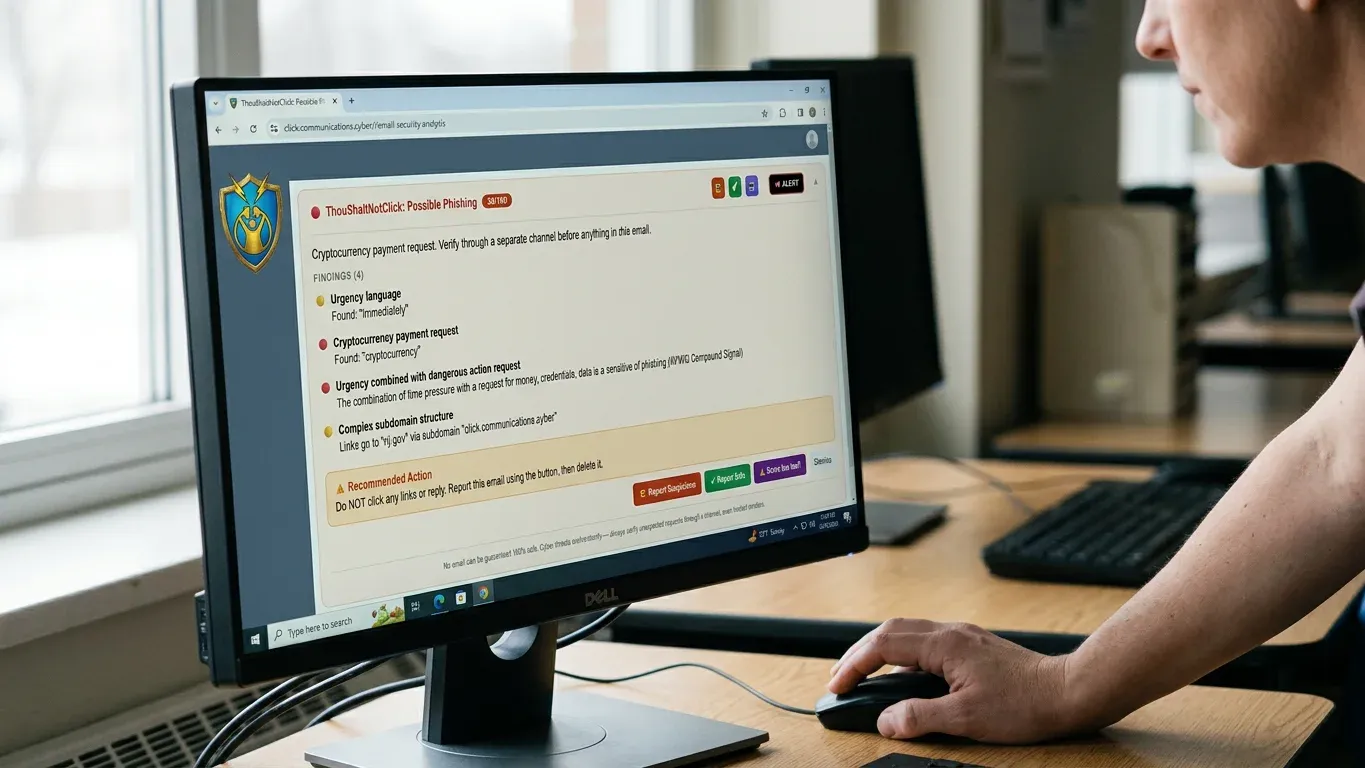
That is where the awareness-first approach matters. When your staff needs that second opinion inside the moment they are already in, ThouShaltNotClick gives the unsure user a trust verdict without turning every question into a hallway fire drill.
A useful workflow looks like this:
The user opens an email and sees a clear trust badge in the inbox experience.
Routine scoring happens on-device in the browser extension, giving the person a reason to pause without slowing normal work.
If the user is unsure, AI-enhanced analysis is opt-in per email on the browser extension, so one questionable message can get a deeper look.
The deeper check evaluates sender patterns, link tricks, visible headers, body content, tone, and intent to flag business email compromise, vendor fraud, and urgency exploits.
The system cross-checks threat signals against sources including Google Safe Browsing, PhishDestroy, WHOIS/RDAP, URLhaus, EmailRep, and IPQualityScore.
Flagged messages flow into the admin review queue so the IT steward works from a prioritized list instead of a scattered inbox full of “is this safe?” forwards.
That queue is the payoff for the whole process. Staff still learn to notice pressure, sender issues, strange requests, and risky links, but the final escalation becomes organized instead of improvised.
Privacy and control note: When AI analysis is invoked, the system transmits the sender, subject, visible headers, full link URLs, and up to 3,000 characters of the body, with the recipient’s own name and addresses stripped first. Anthropic is contractually barred from retaining or training on that transmitted content, and a hard 3,000-character server-side ceiling is enforced at the API boundary. On the browser extension, AI-enhanced analysis is opt-in per email. On the Outlook add-in beta, the same fields are transmitted by default rather than opt-in.
That detail matters because someone in your role will be asked about privacy, and “trust us” is not a plan. Clear boundaries make it easier to explain what happens, what does not happen, and why the tool exists in the first place.
Short, repeated learning also beats one giant annual lecture that everyone survives and immediately forgets. A trust score, a moment of hesitation, and a plain-language finding can teach in the flow of work, where the next real decision is already waiting.
If you want that one-click second opinion in staff inboxes, you can start a trial at thoushaltnotclick.com/signup and put AI email analysis where the decision to click actually happens.
The durable defense is not pretending every bad email will be blocked before a human sees it. The durable defense is helping people recognize danger at the point of decision, then giving them a simple way to escalate before the organization pays for one rushed click.
Frequently Asked Questions
What should I do first if I think an email is a phishing scam?
Stop before you click, reply, download, approve, or pay. Look for pressure, check the sender details, and compare the request against your normal process before taking any action.
Can a phishing email come from a real person’s account?
Yes. Attackers can compromise real accounts or reuse real email threads, which makes the message feel more believable. That is why the request, links, and payment instructions still need to be checked even when the sender looks familiar.
Is it safe to reply and ask if the email is real?
Not inside the suspicious thread. Start a separate conversation using a known phone number, trusted contact record, internal chat, or official system instead.
What information should staff send to IT when reporting a suspicious email?
Staff should preserve the message and include the sender, subject, time received, visible links, attachments, and what the email asked them to do. They should also say whether anyone clicked, replied, entered information, or made a payment.
Can AI email analysis replace security training?
No. AI analysis can give a faster second opinion and help surface suspicious tone, intent, links, and sender patterns, but people still need simple habits. The best setup helps staff learn while they work instead of relying only on a once-a-year reminder.
What should we do if someone already clicked?
Report it immediately through your internal process and stop entering any additional information. Change passwords only through known, trusted channels, and let IT review the device, account, and message before normal use continues.
If you want the “pause, check, verify, escalate” habit built into the inbox instead of taped to the break room wall, start a trial at thoushaltnotclick.com/signup and put AI email analysis in front of staff where the decision happens.